


Yhdistä bluetooth:
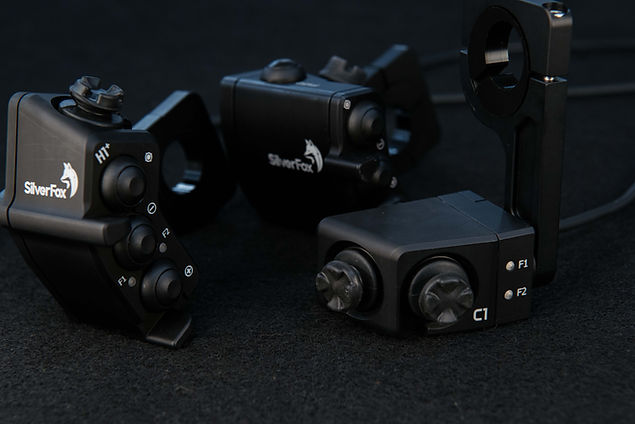
Käynnistä C1 kontrolleri. Avaa Bluetooth asetukset Android laitteessasi. Valitse "H1+SilverFox" bluetooth listasta. Hyväksy paritus. Nyt laite on Bluetooth-yhdistetty.
Yhdistä DMD kaapeliyhteys:
H1+ tukee DMD kaapeliyhteys- kommunikointia. Vaihtaaksesi kaapelitilaan:
- katkaise virta
- paina kumpaakin zoom nappia (kaksi alinta)
- pidä painettuna ja kytke virta
- kumpikin LED palaa yhtäaikaa kaapeliyhteyden merkiksi
Kaapeliyhteys toimii vain DMD järjestelmissä. F1 tai F2 -tilat eivät ole käytössä kaapeliyhteydessä.
Paluu Bluetooth tilaan, toista ohje
Mechanical installation:
The mirror-clutch assembly most likely needs to be adjusted a few millimeters to get the needed space (10 mm) for SilverFox clamp arm.
Slide the plastic adjustment ring on to the 22 mm handlebar. By rotating the adjustment ring you can move the controller forward or backward on the motorcycle handle bar. Clamp the device on the adjustment ring evenly with two M4 screws.
Asennus:
Tee tilaa kontrollerin kiinnitinvarrelle siirtämällä peili-kytkin-kokoonpanoa 9 mm oikealle.
Asenna muovinen säätörulla 22 mm ohjaustankoon. (saatavilla myös 25 mm halkaisijalla). Pyörittämällä säätörullaa voit hienosäätää kontrollerin asentoa eteen- tai taaksepäin. Kiristä laite sopivaan asentoon kiristämällä tasaisesti kumpaakin M4 ruuvia.
Connect the power cord to the fuse protected 12VDC output (post ignition) of your bike (Operating voltage range 5-24VDC). Double check to make sure to connect the cords are correct; Brown wire to negative (-) and White wire to positive (+).
H1 units are supplied with M12 connectors to plug&play with DMD harness. This also supports the DMD T865 cable connection system and gets the 12VCD feed through the connector. Extra cable strip is used for 12VDC power feed for other systems.
Yhdistä virtajohto sulakkeella varmistettuun (virta-avaimella kytkeytyvään) 12VDC ulostuloon. Käyttö jännite laitteelle on 5-24VDC. Varmista RUSKEA johto on miinus (-) ja VALKOINEN on plus (+)
H1 laitteet on varustettu M12 liittimellä, joka sopii Plug&Play DMD T865 laitteiden johtosarjaan. Tukee DMD:n cable connection - yhteyttä ja saa 12VDC syötön liittimen kautta. Ylimääräinen kaapeli voidaan kytkeä 12VDC ulostuloon, jos käytössä ei ole T865 tablettia.

Connect bluetooth:
Power on the SilverFox navigation controller. Open the Bluetooth settings on your Android device. Find and tap on the device e.g. "H1+SilverFox" from the list of devices. Accept the pairing request. Your SilverFox navigation controller is now paired using Bluetooth.
Connect cable for DMD:
H1+ also supports the DMD cable connection communication system. To enter the cable connection mode:
- turn off the power
- press and hold both zoom buttons (two lower buttons)
- keep holding and turn the power ON
- both LEDs are lit for successful cable connection
Cable mode compatible only in DMD ecosystem. F1 and F2 modes are not available in Cable connection mode.
Returning back to Bluetooth mode repeat the instructions above.
Center
Zoom out
Zoom in

Panning Joystick
Operating the HomeOne:
The Keysets F1 and F2:
The controllers has two selectable keysets. Both keysets are pre-programmed to send different key codes to the Android device. For example, the zoom in button sends a different command in F1 set than in F2 mode.
In HomeOne and HomeOne+ controller press both Zoom buttons shortly at the same time, toggles between F1 and F2. LED light shows the active F-mode
F1-keyset:
Select this keyset for map applications such as Google Maps, Calimoto, Gaia GPS, etc. (listed in InControl app and website).
Joystick movements corresponding left, right, up and down
+ and - buttons are zoom in and out
The centering/orientation button center the map to your current position.
F2-keyset:
Select this keyset for apps that havespecial key mappings like MyRoute, Stegra.io, Kurviger, DMD2, Mapitare, Ranniot, Tracker, Locus Maps or Osmand
.
Joystick movements corresponding left, right, up, and down
Center => letter 'C'
Center hold => letter 'D'
+ => character '='
Hold + => letter 'A'
- => character '-'
Hold - => letter 'B'
HomeOne (H1 ja H1+) käyttö:
F1 ja F2 -käyttötilat
H1(+) kontrollerissa on kaksi valittavaa key-settiä, F1 ja F2. Kummatkin on esi-ohjelmoitu. Tilat lähettää eri komentoja Android laitteeseen. Esimerkiksi "zoom in" lähettää F1-tilassa eri komennon kuin F2 tilassa.
Vaihtaaksesi F-tilan H1 tai H1+ kontrollerissa, paina kumpaakin zoom näppäintä lyhyesti yhtäaikaa. H1+ LED valot näyttävät aktiivisen F-tilan.
F1-tila:
Käytä tätä tilaa karttasovelluksissa kuten Google Maps, Calimoto, Gaia GPS, jne. (InControl appsin alaisia ohjelmia. Lista löytyy ohjelmasta ja sivuilta) .
Joystick liikkeet ovat vasen, oikea, ylös ja alas.
+ ja - näppäimet ovat zoom in ja out
Keskitys näppäin keskittää kartan.
F2-tila:
Käytä F2 tilaa ohjelmiin kuten MyRoute, Stegra.io, Kurviger, DMD2, Mapitare, Ranniot, Tracker, Locus Maps or Osmand...
Joystick liikkeet ovat vasen, oikea, ylös ja alas.
Center => kirjain 'C'
Center pito => kirjain'D'
+ => merkki '='
pito + => kirjain 'A'
- => merkki '-'
pito - => kirjain 'B'
Troubleshooting:
In some cases, setting your device's language to German could cause issues with certain controller commands. Please change the operating system to English.